Backup and restore
pgNimbus backs up with PostgreSQL's own pg_dump and restores with its
pg_restore, so a backup is a normal PostgreSQL backup that any PostgreSQL tool
can read. It covers the simple cases: all of a database, one schema or one
table, with or without the rows, and putting a backup back. For scheduled
backups, parallel dumps, roles and other cluster-wide objects, use a dedicated
tool such as pg_dumpall, pgBackRest or your cloud provider's snapshots.
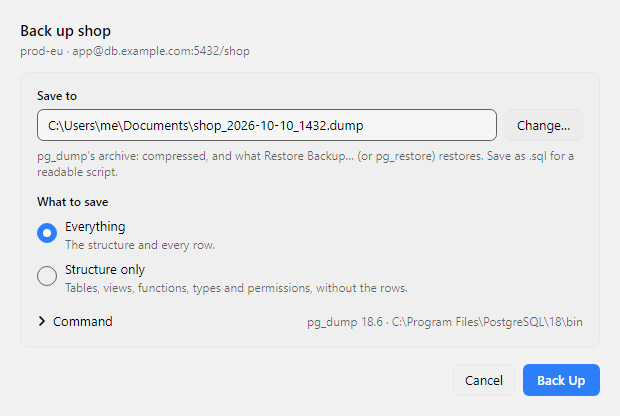
Back up a database, a schema or a table
- The whole database: Back Up Database… in the ☰ menu, the command palette, or the File menu on macOS.
- One schema: right-click it in the schema tree and choose Back Up Schema….
- One table, with its partitions if it has any: right-click it and choose Back Up Table….
The window asks two things:
- Where to save. pgNimbus suggests a file named after the database and the time, in the folder you used last. Change… picks another.
- What to save. Everything is the structure and every row. Structure only is the tables, views, functions, types and permissions, without the rows.
The kind of file follows its name:
.dump(the default) ispg_dump's compressed archive. Restore it with Restore Backup…, or withpg_restore..sqlis a plain SQL script you can read, compare and keep in Git. Restore it withpsql.
Click Back Up. The window shows which table is being saved, how long it has taken and how big the file is so far. You can keep working in the main window while it runs. When it finishes, Show in Folder opens the folder that holds the file.
A failed backup never destroys an older one
pg_dump writes to a temporary .partial file next to the one you chose,
and pgNimbus moves it into place only when the backup finishes. If the
backup fails, or you click Stop, the temporary file is deleted and a
file that was already at that path stays as it was.
Restore a backup
Restore Backup… is in the ☰ menu, the command palette, and the File menu on macOS. It restores into the server the window is connected to.
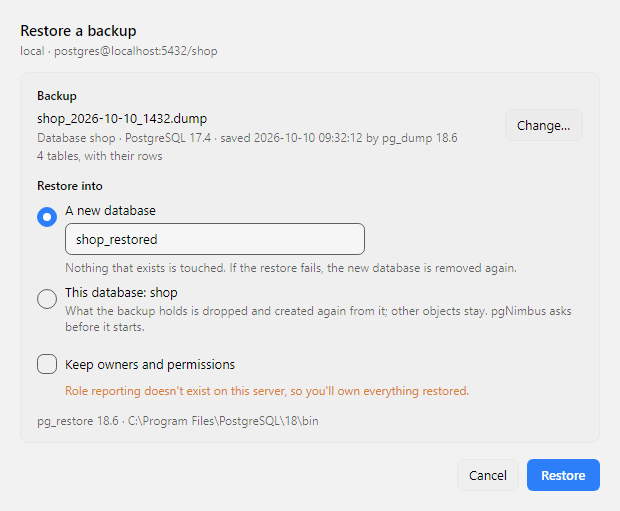
- Choose the file. pgNimbus reads what it holds before anything runs: the database it came from, the PostgreSQL release, when it was saved and how many tables it has.
- Choose where it goes.
- A new database (the default). pgNimbus creates it and restores into it,
so nothing that exists is touched. It suggests the backup's own database
name, with
_restoredon the end if that name is taken. - This database. What the backup holds is dropped and created again from it, rows included. Other objects in the database stay. pgNimbus asks before it starts.
- A new database (the default). pgNimbus creates it and restores into it,
so nothing that exists is touched. It suggests the backup's own database
name, with
- Keep owners and permissions, or not. Kept, every object belongs to the role it belonged to before. A backup from another server often names roles this server doesn't have; pgNimbus checks, and turns this off when one is missing, so you own everything restored instead.
A restore is one transaction: it all happens, or none of it does. If it fails, or you click Stop, the database is as it was, and a new database that pgNimbus created for it is removed again. After a restore into a new database, Open in New Window connects to it the way the current window is connected.
A backup of one schema or table can point outside itself: a foreign key to a table in another schema, a view over one, a column of a type defined elsewhere. In a new, empty database those aren't there and the restore stops. Restore it into a database that has them, such as the one it came from.
pgNimbus restores pg_dump's archives (.dump, .backup, .tar). It doesn't
restore a plain .sql script: that needs psql, and psql also runs any shell
commands a script holds, so run a script you trust with psql -f yourself.
A restore runs the SQL the backup holds as your role, so restore backups you
trust.
Installing pg_dump
pgNimbus doesn't ship pg_dump and pg_restore, and doesn't download them. It
finds the copies that come with PostgreSQL, pgAdmin, Postgres.app or Homebrew,
in the places they install them, so most people never have to point it
anywhere.
pg_dump must be at least as new as the server: a PostgreSQL 17 server needs
pg_dump 17 or newer. A newer pg_dump backs up every older server, so
installing the newest release is always enough. When no copy is new enough,
the backup window says which version it needs, what it found instead, and the
steps for your system. In short:
Download the PostgreSQL installer from EDB, run it, and on the Select Components page leave only Command Line Tools checked. Or, from a terminal:
and choose Command Line Tools when the installer asks. pgNimbus finds
C:\Program Files\PostgreSQL\18\bin on its own. If pgAdmin 4 is
installed, pgNimbus can use the copy that comes with it too.
With Homebrew:
Or install Postgres.app; it includes the client programs, and you don't have to start its server.
On Debian and Ubuntu, add PostgreSQL's own package repository (your distribution's packages are often older than the server), then install the client:
sudo apt install -y postgresql-common
sudo /usr/share/postgresql-common/pgdg/apt.postgresql.org.sh
sudo apt install postgresql-client-18
On Fedora, RHEL and their relatives, set up the
PostgreSQL repository
and install postgresql18. On Arch, install postgresql-libs.
Then click Look Again in the backup or restore window.
If your copy is somewhere pgNimbus doesn't look, open Settings, go to the
Data tab and choose the folder that holds pg_dump and pg_restore.
The same card shows which copy pgNimbus uses.
Your password and the command line
pgNimbus starts pg_dump and pg_restore with the same server, database, user
and TLS settings as the window you started them from. It passes the password in
their environment and never on their command line, which any user on the
computer can read. Under the backup form, Command shows the exact command
pgNimbus runs, without the password, so you can copy it and run it yourself.
Through an SSH tunnel, both go through the window's tunnel, so keep the window open until they finish. pgNimbus asks before closing a window whose backup or restore is still running.