Connecting to a database
pgNimbus opens the connection dialog on launch.
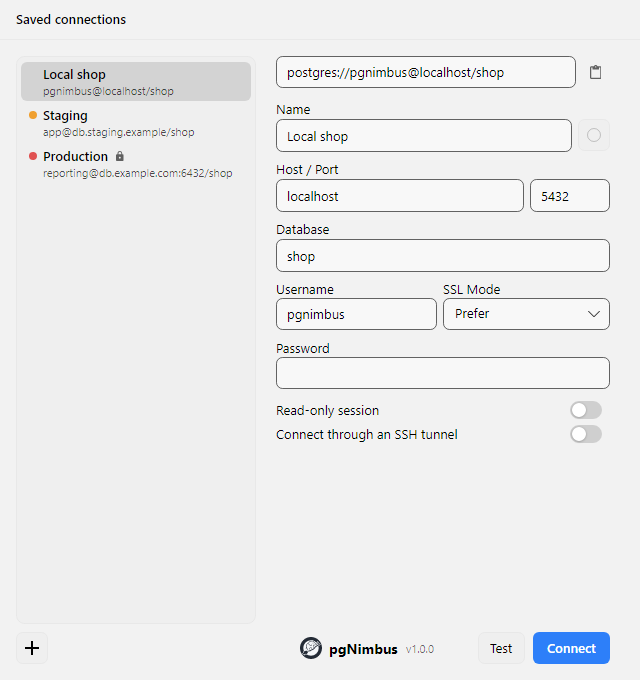
Paste anything
The box at the top of the dialog accepts whatever form of connection string you already have, and fills the form out for you. All of these work:
postgres://alice:s3cret@db.example.com:5433/appdb?sslmode=require
jdbc:postgresql://db.example.com:5433/appdb?user=alice&ssl=true
Host=db.example.com;Port=5433;Database=appdb;Username=alice;Password=s3cret
host=db.example.com port=5433 dbname=appdb user=alice sslmode=require
PGPASSWORD=s3cret psql -h db.example.com -p 5433 -U alice appdb
That last one means you can copy a psql command straight out of a runbook or a
hosting provider's dashboard and paste it in.
Where your password goes
Database and SSH passwords are kept separately from the connection profile: DPAPI-encrypted files on Windows, Keychain on macOS, and Secret Service through libsecret on Linux. A password is written there a moment after you stop typing it. Clearing the field removes the stored one. These stores can persist protected data on disk.
Linux requires libsecret-1.so.0 and a running Secret Service provider such as
GNOME Keyring. If storage is unavailable or access is denied, the dialog warns
and keeps entered passwords in memory for this app session. Unlock/configure
the OS store and edit the password again to retry. On macOS, Keychain access must be available
without an interactive authorization prompt; resolve restrictions in Keychain Access.
When an old macOS/Linux profile is opened, pgNimbus attempts to migrate its
unencrypted base64 .cred files. It deletes an old file only after reading the
saved password back from the OS store. On failure the old file stays and a warning
appears; unopened profiles are not migrated yet. If a different OS-store value
already exists, it takes precedence; editing the password resolves the old copy.
Deleting a profile attempts to remove database and SSH credentials from both
locations and reports failures. Query history and workspace SQL remain local,
unencrypted data; credential protection does not encrypt them.
That is a design rule rather than a setting. The profile record has no field to put a password in, so a profile file cannot leak one even if you copy it somewhere.
Saved profiles
There is no Save button. Start typing into an empty form, or paste a connection
string, and the connection appears in the list on the left of the dialog. Every
later change to a selected profile is kept as you make it, whether you connect
or not. Press New for a blank form. Each row shows who connects where, as
user@host/database, so two profiles on the same server are told apart without
clicking either.
The connection you used last is already selected when the dialog opens, with the password loaded, so launching pgNimbus and pressing Enter reconnects to it. Pick another with the arrow keys and press Enter, or double-click any profile to connect to that one.
Right-click a profile for Connect, Duplicate and Delete. Duplicate is the fast way to add a second database on the same server: it copies the host, SSL mode, SSH settings and password, and you change only what differs.
Give production a colour. Each profile carries an accent colour, picked from the round swatch next to the name field. It shows as a dot in the main window's command bar and runs through the window's chrome. Making production red and staging green is the cheapest possible guard against running the right query against the wrong server.
Read-only connections
Switch on Read-only session for a profile you only mean to read from, such
as production. Every session then starts with default_transaction_read_only
on, so the server itself refuses INSERT, UPDATE, DELETE, COPY FROM and
DDL. It refuses them from the editor, the results grid, an import and a schema
action alike, because the check isn't in pgNimbus. The profile gets a lock in
the list.
The main window shows read-only with a lock next to the host and database,
and the results grid doesn't offer editing. pgNimbus asks the server when the
window opens, so the mark also appears when the server makes the session
read-only on its own: a role or database with default_transaction_read_only
set, or a standby replica.
This guards against mistakes. It isn't a permission. A statement can still
switch it off for its own session with SET default_transaction_read_only =
off. To make writes impossible, connect as a role that has no write
privileges.
SSH tunnels
A profile can carry SSH tunnel settings, so a database that is only reachable from a bastion host connects like any other. The tunnel is owned by the window, so closing the window tears it down.
Pick how pgNimbus signs in to the SSH host with Auth Method:
- SSH agent uses the keys your agent already holds. On Windows that is the
OpenSSH Authentication Agent service; on macOS and Linux it is the agent
SSH_AUTH_SOCKpoints at. A key with a passphrase works without typing it here, as long as you have added it withssh-add. Nothing is stored. - Key file reads a private key from disk. Leave the path blank to use the
same defaults
sshtries (~/.ssh/id_ed25519, thenid_ecdsa, thenid_rsa). If the key has a passphrase, type it below; it is stored like a password. - Password signs in with the SSH user's password.
For the database host and port, give them as the SSH host sees them. A Postgres
that only listens locally on the server is 127.0.0.1 and 5432.
Several connections at once
Two different things, for two different needs.
Open a connection in a new window (Ctrl+Shift+N)
gives that connection a fully independent window: its own connection pool,
LISTEN/NOTIFY listener, SSH tunnel, and workspace of tabs. Use this to put dev
and prod side by side.
Switch connection (Ctrl+Shift+O) repoints the current window at a different server without restarting the app.
Both are also in the menu behind the ☰ button and in the command palette.
If the connection drops
A connection dropped by laptop sleep, a network blip or an SSH tunnel hiccup is reopened quietly on your next run. pgNimbus flushes the dead pool and retries once on a fresh connection, so you usually will not notice.
The one case it deliberately does not paper over is an open explicit transaction. A transaction lives on one held connection; if that connection dies, the transaction is gone and nothing in it committed. Rather than silently starting a new one and leaving you to guess what happened, pgNimbus surfaces a clear "connection lost, nothing committed" error.
Skipping the dialog
Set the PGNIMBUS_CONN environment variable to any of the formats above and
pgNimbus connects straight to it, skipping the dialog. Handy for scripted or
repeated local testing:
For everyday use there is a switch in Settings, Open the last connection on startup, which goes straight to whatever you connected to last. The dialog stays one Switch connection away, and a connect that fails lands back in it with the error.